Stop Manually Testing
AI-Generated Code
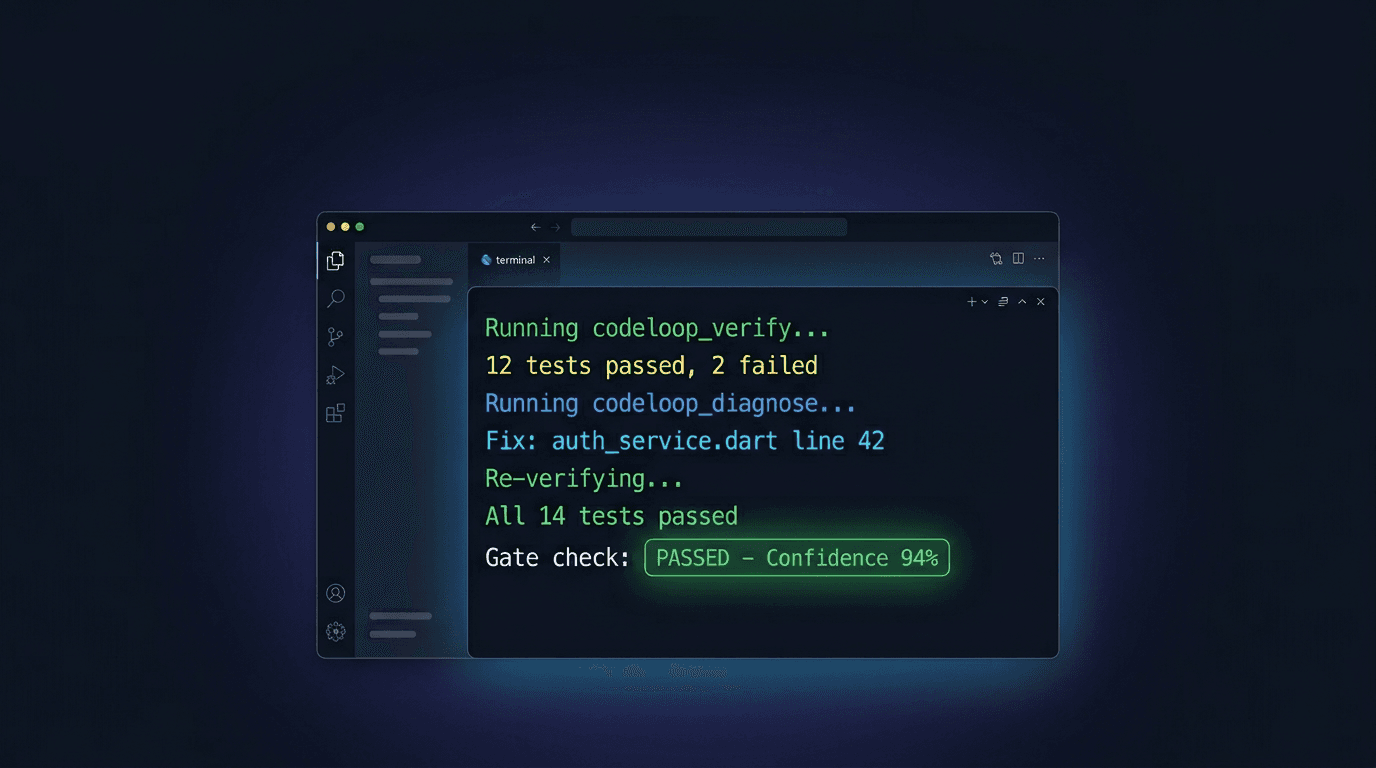
29 MCP tools that run your build, capture screenshots, record video with ffmpeg, diff against Figma, perform real UI interactions via Playwright, and block shipping until confidence hits 94% — inside Cursor and Claude Code.
No credit card required · Works with Cursor & Claude Code
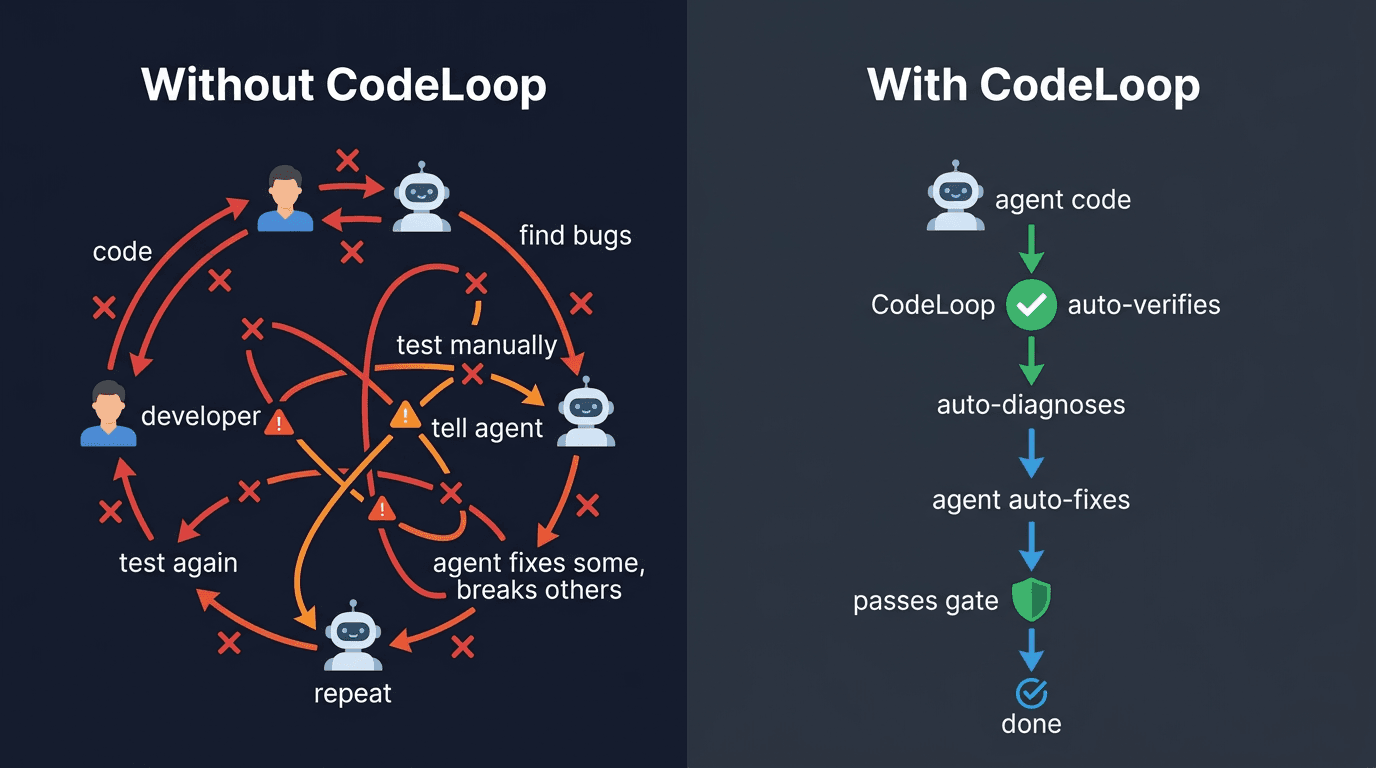
The Problem with AI-Powered Development
AI agents write code fast, but without automated verification, you're stuck in an endless loop of manual testing and back-and-forth.
How It Works
Three steps. One command. Your AI agent goes from “it compiles” to “it actually works.”
Install
One command sets everything up. CodeLoop detects your project type, creates MCP config, and configures your AI agent automatically.
Code Normally
Your AI agent (Cursor or Claude Code) implements features as usual. Nothing changes about your workflow. Just give it tasks like you always do.
CodeLoop Auto-Verifies
After each implementation, CodeLoop automatically runs verification, diagnoses failures, and the agent fixes issues — all without your intervention.
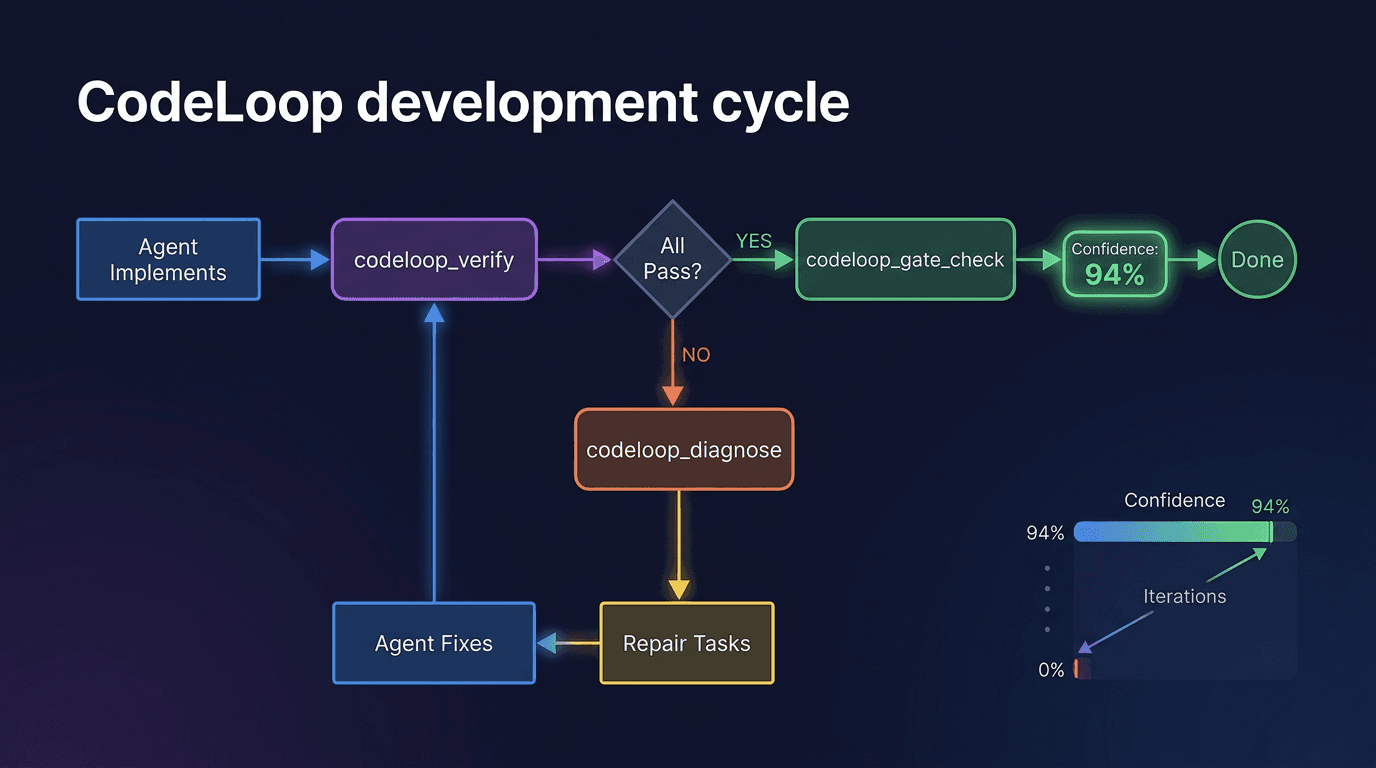
The CodeLoop Development Cycle
A self-repairing loop that runs until your code reaches high confidence. No human in the loop until the work is done.
MCP tools orchestrating every step
Confidence threshold before human review
Verification layers (build to audit trail)
Manual test runs needed during the loop
8 Layers of Verification
CodeLoop doesn't just run your tests. It captures screenshots, records video, diffs against Figma, performs real UI interactions, correlates app logs, and blocks shipping until a composite quality score passes. All orchestrated by 29 MCP tools in a single system.
Build + Test + Lint
npm test, flutter test, Gradle, xcodebuild
Runs your full build pipeline, test suite, and linters. Catches compiler errors, logic bugs, and style violations before anything else.
Screenshot Capture
screencapture, ffmpeg, Playwright page.screenshot()
Captures every page across viewports (mobile, tablet, desktop). Pixel-level baseline comparison detects visual regressions humans miss.
Figma Design Gates
Figma REST API + pixelmatch
Fetches Figma frames automatically, pixel-diffs against your coded UI. A blocker gate that refuses to pass until the design matches.
Video Recording
ffmpeg avfoundation / gdigrab / x11grab
Motion-validated screen recording with multi-monitor support. Captures transitions, animations, and real-time state changes. Static videos are auto-rejected.
Interaction Testing
Playwright, osascript, adb, simctl, Maestro
40+ real UI actions — click, type, swipe, scroll, drag, fill forms — across macOS, Windows, Linux, Android, and iOS. On the actual device, not a mock.
App Log Correlation
flutter logs, adb logcat, browser console, stderr
Captures runtime logs during recording. The AI correlates visual frames with stack traces, exceptions, and warnings for root-cause analysis.
Quality Gate Check
Confidence scoring engine
94% confidence threshold with zero-blocker enforcement. Evaluates build, tests, screenshots, video, design match, and interaction coverage as a composite score.
Development Report
docs/DEVELOPMENT_LOG.md
Full audit trail: every verification run, every screenshot, every bug caught and fixed. The "Verified by CodeLoop" badge with run IDs and confidence scores.
MCP Tools
UI Actions
Platforms
Verification Layers
Why CodeLoop Wins
Other tools check one thing. CodeLoop integrates Playwright for browser automation, ffmpeg for video capture, Figma REST API for design diffing, pixelmatch for pixel comparison, and native OS-level interaction across 5 platforms — all orchestrated by 29 MCP tools.
Runs Locally
MCP server on your machine. Zero cloud latency for verification. Your code never leaves your computer.
Agent-Native
Built for MCP (Model Context Protocol), the open standard supported by both Cursor and Claude Code.
Evidence-Based
Every decision backed by build logs, test results, screenshots, and traces. No guesswork.
Confidence Scoring
Quantified readiness with gate checks. Know exactly how confident you should be in the output.
Multi-Section Orchestration
Builds entire apps section-by-section without waiting for human input after each one.
Near-Zero Cost
Your AI agent uses its own tokens. CodeLoop just orchestrates the loop — no expensive cloud compute.
Cross-Platform Native
macOS, Windows, Linux, Android, iOS — with native runners for Xcode, Gradle, .NET, Flutter, and Playwright.
Figma Design Gates
A blocker gate that fetches your Figma frames and refuses to pass until pixels match across every viewport.
22 MCP Tools. One System.
The most comprehensive AI agent verification suite available. From codeloop_verify to codeloop_design_compare to codeloop_interact— every tool your agent needs to go from “it compiles” to “it actually works, looks right, and passes every quality gate.”
Automated Verification
Build, lint, test, and screenshot — all in one call. CodeLoop runs every check your project supports and returns structured results.
Smart Diagnosis
Categorizes failures by type (bug, flaky test, missing dependency, config error), prioritizes by severity, and provides targeted repair tasks.
Visual UI Review
Captures screenshots across viewports, compares against baselines, and detects visual regressions with pixel-level accuracy.
Design Comparison
Match your coded UI against Figma designs or reference images. A blocker gate refuses to pass until pixels match your design spec.
Gate Checking
Confidence-scored pass/fail with a 94% threshold. Gates enforce build, tests, screenshots, video, and design match before shipping.
Multi-Section Orchestration
Build entire applications section-by-section. CodeLoop manages the dependency graph and continues autonomously.
Interaction Testing
40+ actions across macOS, Windows, Linux, Android, and iOS. Click, type, swipe, scroll — on the actual device, not a mock.
Video Recording
Motion-validated screen recording with multi-monitor support. Static videos are auto-rejected — only real interactions count.
Always-On Activation
One global install, every future project auto-triggers CodeLoop. No per-project setup needed after the first time.
Works Everywhere You Develop
CodeLoop runs on your machine via MCP. If your AI agent and dev tools run on your OS, CodeLoop works.
One tool. Any agent. Any platform. Any framework.
AI Agents
Cursor & Claude Code via MCP
Any OS
macOS, Windows, Linux
Mobile Apps
Flutter, React Native (iOS + Android)
Web Apps
React, Vue, Angular, Next.js
Simple, Developer-Friendly Pricing
CodeLoop runs locally — your AI agent uses its own tokens. We don't burn cloud compute, so we pass the savings to you.
Trial = full Team tier. Try the exact product paying teams use — 14 days, no credit card.
Ready to Automate Your Development Loop?
Install CodeLoop in under a minute. Your AI agent handles the rest.
14-day free trial · No credit card required · Cancel anytime